Think Like a Developer Without Coding
At the end of a busy week, unfinished tasks are often scattered across messy notes, quick messages, and half-remembered reminders. Sitting down on Friday afternoon to reread every scrap of text can feel like starting another full workday.
Many people try pasting those notes into an artificial intelligence assistant with a request like "organize my week." The assistant usually returns a polite, lengthy schedule that sounds impressive. When you inspect it closely, problems appear. It invents deadlines you never agreed to, drops tasks marked as done, and guesses who owns an unassigned job.
You do not need to learn a programming language to fix this. You do need to borrow how experienced software developers approach problems. In disciplined software engineering, teams break work into bounded pieces, define the exact information going in, specify what an acceptable result looks like, test the outcome, and improve it one step at a time.
You can apply those exact habits to ordinary administrative tasks. The assistant does the reading, grouping, and initial drafting. You make the decisions.
Turn a Vague Request into a Bounded Job
A vague prompt gives an artificial intelligence model too much room to guess. If you ask an assistant to "manage my projects," it must decide what matters, what to ignore, and how to format the answer. When an assistant has to guess your intent, it often fills gaps with plausible inventions.
In software work, an input is the exact material supplied to a system, and an output is the finished artifact returned to you. Giving an assistant a small job means defining both clearly:
- The input: A specific set of notes that you have reviewed and decided to share.
- The output: A single, inspectable document, such as a plain-text action summary with open questions.
- The boundary: What the assistant is forbidden from doing, such as guessing missing facts, contacting outside services, or altering original files.
Instead of asking the model to solve your entire week, ask it to read three specific notes, pull out open tasks, list unresolved questions, and leave your original notes untouched.
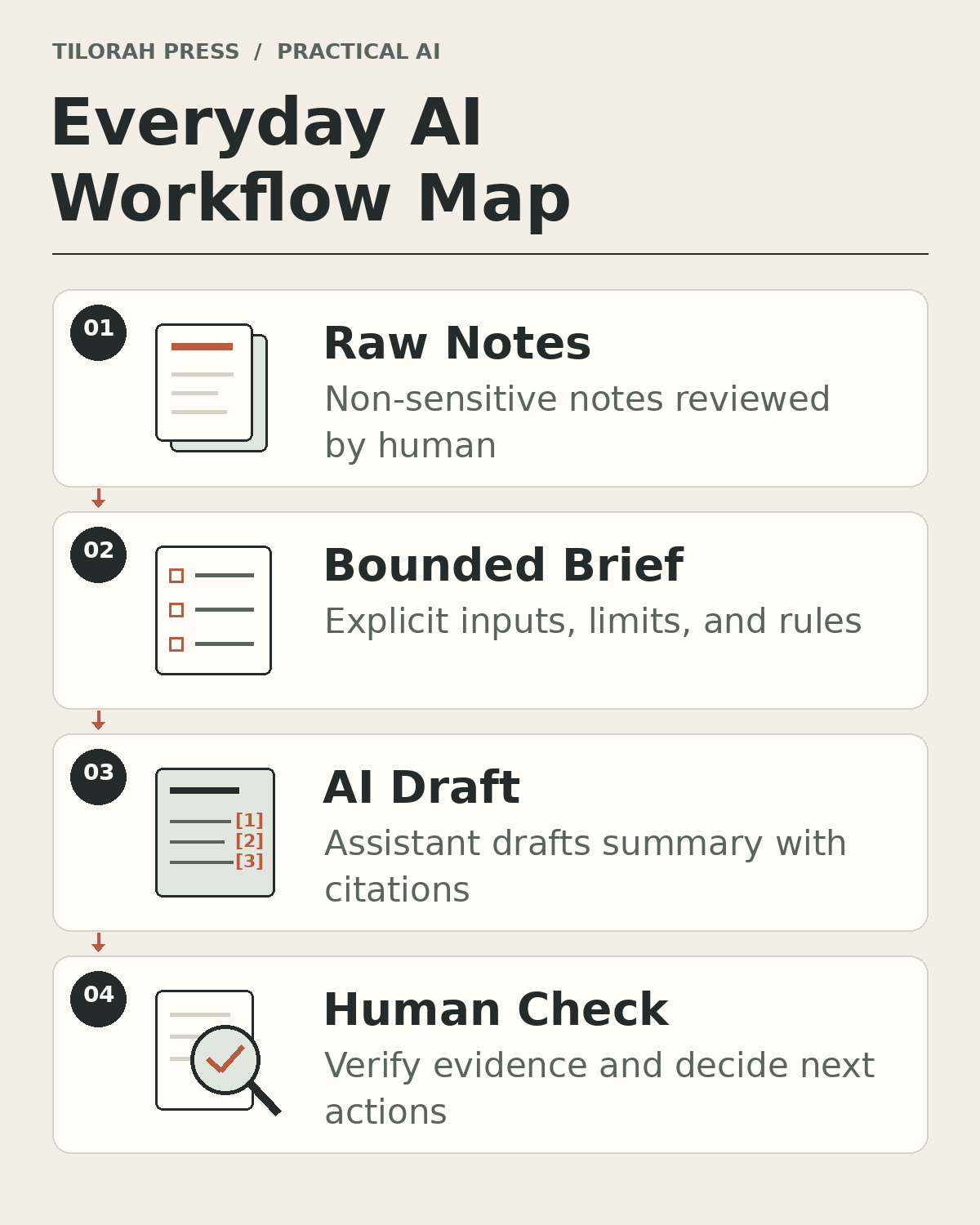 Figure 1: The everyday AI workflow separates your source notes from the assistant draft, passing through explicit rules and inspectable checks before any action is taken.
Set Observable Acceptance Criteria
In software engineering, acceptance criteria are the observable conditions a piece of work must satisfy before anyone calls it done. You do not need technical jargon to write them. Plain sentences work best.
When you ask an assistant to summarize notes, provide simple rules that a human can verify:
- Source attribution: Every action must cite the specific note it came from.
- Status tracking: An item marked finished in a later note must never appear as an active task.
- Uncertainty preservation: If an action has no agreed deadline or owner, label it as unknown rather than inventing one.
- Conflict detection: If two notes give conflicting dates or requirements, state the conflict clearly instead of picking a winner.
These criteria transform a vague reading exercise into an objective test. You no longer have to ask the assistant whether it did a good job. You can look at the draft, check citations, and verify whether the rules were followed.
A Realistic Example with Fictional Notes
To see how this works, imagine a small business owner reviewing notes from three different days. This example is fictional:
Monday note:
Ask the print shop for an updated brochure quote. No deadline set.

Wednesday note:
The printer quote arrived at 450 credits for 500 copies. Compare it with the previous quote before ordering. Maya approved the cover photos.

Friday note:
Delivery date for the brochures still needs confirmation. Maya is away until Tuesday.
A poor AI response combines these notes into a generic guess: "Follow up with Maya on Monday about the printer quote and schedule the brochure delivery for next week."
That response fails three basic checks. It omits the quote comparison, proposes a Monday follow-up while Maya is away, and offers a premature next-week delivery suggestion when the date still needs confirmation.
A disciplined brief produces a checkable draft, though following a brief still requires human inspection:
Open Actions:
- Compare the new brochure quote (450 credits for 500 copies) against the previous quote before ordering. (Source: Wednesday note)
- Confirm the brochure delivery date with the printer. (Source: Friday note)

Completed Work:
- Brochure cover photos approved by Maya. (Source: Wednesday note)

Unresolved Questions:
- Who will contact the printer to confirm delivery while Maya is away? (Source: Friday note)
- What was the unit price on the previous brochure quote? (Source: Wednesday note)
Notice what makes this output useful. Every line cites its source. Open tasks are separated from completed tasks. Missing information is highlighted as a question for you to resolve, rather than hidden behind a guess.
Keep Boundaries and Safeguards Intact
Modern developer-oriented tools can interact directly with files on your computer. That capability makes them effective at processing local text files, but it also introduces practical responsibilities.
First, natural language instructions in a prompt are requested limits, not enforced software permissions. Telling an assistant "please only read this folder" does not prevent unauthorized file access. Enforced security requires actual software permission checking within the tool or operating system. Because product controls vary across tools and platforms, keep manual confirmation modes enabled, recognize that product controls differ, and always retain human review before any change is made or action executed.
Second, working with a local folder does not mean your work stays offline. Most desktop assistants transmit text to cloud models to process requests. Never include sensitive personal data, passwords, financial records, or confidential customer details in practice files.
Third, maintain clean source backups outside your working workspace. Keep a copy of your notes in another directory. If an assistant misinterprets a command or alters a file during testing, you can restore your original material in seconds.
Improve the Process One Step at a Time
In programming, iteration means making a single small change, testing the result, and observing the difference. Beginners often change the prompt, the input files, and the output format all at once when an assistant makes an error. When the next attempt produces a different result, they cannot tell which change helped and which one created new problems.
If an assistant misses a completed task in your notes, keep your input files the same and tighten one status rule in your brief. Rerun the test. If the assistant now catches the completed task without breaking other items, you have made a genuine improvement. Save that working prompt as a reusable template.
The Distinction Between Drafting and Deciding
The real power of developer thinking is clarity. By breaking your administrative work into explicit inputs, structured briefs, and testable outputs, you reduce uncertainty and create an inspectable draft you can verify.
The assistant is an efficient reader and drafter. It can scan notes, sort items by topic, and draft structured summaries quickly. But it cannot take responsibility for your business or your team. Deciding which quote to accept, who to assign a sensitive task to, and whether a project is ready for launch remains your job.
When you treat AI as a junior assistant that drafts checkable work against strict rules, you can speed up initial drafting without sacrificing judgment. Start with one small problem, build a test you can inspect, and expand your workflow only after basic runs produce checkable results.
For future updates, companion guides, and practical workflows, visit PB's writing page or the homepage.